useReducer
- React useState: simple State
- React useReducer: complex State
- React useContext: global State
useState is easy to manage a single state, but if you need to handle multiple states and make it easier to maintain, you can consider using useReducer.
For example:
const initFirstUser = {
  id: "0391-3233-3201",
  firstName: "Bill",
  lastName: "Wilson",
  city: "Missoula",
  state: "Montana",
  email: "bwilson@mtnwilsons.com",
  admin: false
};
Usage
(state, action) => newState
useReducer accepts a (state, action) => newState and returns the current state along with its associated dispatch method. (If you are familiar with Redux, you already know how this works.)
Write a reducer example:
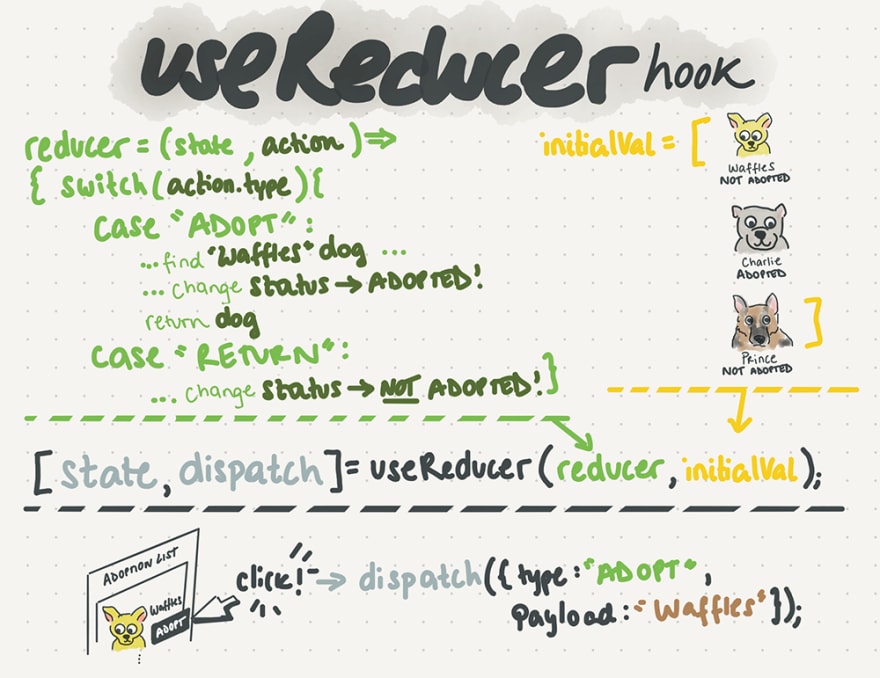
The first step is to initialize the initialValue. Then, proceed to write methods on how to update the state
import React, { useReducer } from "react";

const initialValue = { count: 0 };

const reducer = (state, { type }) => {
  switch (type) {
    case "add":
      return { ...state, count: state.count + 1 };
    case "minus":
      return { ...state, count: state.count - 1 };
       case "reset":
      return { ...state, count: 0 };
    default:
      return state;
  }
};
When the user clicks a specific button, it triggers an action to update the count value. The page then displays the updated count.
export default function App() {
  const [state, dispatch] = useReducer(reducer, initialValue);
  return (
    <div className="App">
      <h1>Hello useReducer</h1>
      <h2>{JSON.stringify(state)}</h2>
      <button onClick={() => dispatch({ type: "add" })}>add</button>
      <button onClick={() => dispatch({ type: "minus" })}>minus</button>
      <button onClick={() => dispatch({ type: "reset" })}>reset</button>
    </div>
  );
}
In React, the dispatch function is guaranteed to be stable and will not change during re-renders. This is why it is safe to omit it from the dependency list of useEffect or useCallback.
If the value returned by the Reducer Hook is the same as the current state, React will skip the render of child components and the execution of effects. (React uses the Object.is comparison algorithm.)
text input
use in useState
import React, { useState } from "react";

export default function App() {
  const [email, setEmail] = useState("");
  const [password, setPassword] = useState("");

  return (
    <div className="App">
      <h2>{JSON.stringify({ email, password }, null, 2)}</h2>
      <label>
        <input
          onChange={(e) => setEmail(e.target.value)}
          value={email}
          type="text"
        />
      </label>
      <label>
        <input
          onChange={(e) => setPassword(e.target.value)}
          value={password}
          type="text"
        />
      </label>
    </div>
  );
}
UI State: useSate custom hook :(Re-using logic)Taking common logic and abstracting it for reusability, for tasks like handling data logic, etc. By creating custom hooks, they can be extracted from components. (Not UI State)
Render prpos : (Re-using layout) enables us to re-render only the relevant content and place any reusable state logic in a Container component. For example, this can be used to create the layout of multiple forms, where each form has different child components.
If you want to isolate a portion of JSX and inject some state without introducing side effects to the component, render props are very useful.
text input
use in useReducer
const initialValue = { email: "", password: "" };

const reducer = (state, { type, payload }) => {
  return { ...state, [type]: payload };
};
The reducer expects to receive an action and a type. The type and payload are used to return the current state and update it with the specified [type]: payload
export default function App() {
  const [state, dispatch] = useReducer(reducer, initialValue);
  return (
    <div className="App">
      <h2>{JSON.stringify(state, null, 2)}</h2>
      <label>
        <input
          type="text"
          value={state.email}
          onChange={(e) => dispatch({ type: "email", payload: e.target.value })}
        />
      </label>
      <label>
        <input
          type="text"
          value={state.password}
          onChange={(e) =>
            dispatch({ type: "password", payload: e.target.value })
          }
        />
      </label>
    </div>
  );
}
The onChange event can be modified to accept name and value.
 const onChange = ({ target: { name, value } }) => {
    dispatch({ type: name, payload: value });
  };

  .
  .
  .
  return (
  <>
    <input
        value={state.email}
        name="email"
        onChange={onChange}
    />
  </>
  )
The input component can also be modified to accept value, type, and onChange event.
 const InputTextfield = ({ value, type, onChange }) => {
  return <input value={value} type={type}
  onChange={onChange} />;
  };

  .
  .
  .
  return (
  <>
   <InputTextfield
        value={state.email}
        type="text"
        onChange={(e) => dispatch({ type: "email", payload: e.target.value })}
      />
  </>
  )
useState vs. useReudcer
- useStatet : Suitable for managing simple states.
- useReducer : Suitable for complex state objects or state transitions, with a focus on maintainability and predictability.
useContext v.s. useReudcer
-
useContext : Accessible state, avoiding the need for prop-drilling (passing state down through multiple layers of components).
-
useReducer : If you have used Redux, you are certainly familiar with it. Redux is primarily used for updating complex state logic.
p.s. Beginners will think that the context itself is a state management system ❌ It is just a dependency injection mechanism, so you can wrap any required values in a context. In most cases, you would be the one using the useState or useReducer hooks to manage the state in React components.
Combining useReducer with useContext creates one form of state management system. This is akin to how Redux works with React, but useContext itself is not a state management system.
Redux v.s. useReudcer
- Redux : Created a global state container.
- useReducer : Created a separate component-local state container within your component.
The built-in context and useReducer hooks in React can achieve similar functionality to Redux, but I believe Redux still has its place and necessity. For example, when handling asynchronous flows, Redux offers middleware like redux-thunk or redux-saga, which can be used to manage asynchronous actions more easily. On the other hand, using hooks might require handling more things manually, such as using useEffect for side effects. Ultimately, the decision should be based on the specific requirements of the project!
References:
- https://zh-hant.reactjs.org/docs/hooks-reference.html
- https://dev.to/milu_franz/demystifying-react-hooks-usereducer-3o3n
- https://dev.to/milu_franz/demystifying-react-hooks-usecontext-5g4a
- https://medium.com/%E6%89%8B%E5%AF%AB%E7%AD%86%E8%A8%98/react-hooks-usestate-vs-usereducer-b14966ad37dd
- https://medium.com/hannah-lin/react-hook-%E7%AD%86%E8%A8%98-usereducer-%E7%9C%9F%E7%9A%84%E8%83%BD%E5%AE%8C%E5%85%A8%E5%8F%96%E4%BB%A3-redux-%E5%97%8E-fabcc1e9b400
Here are the resources, you can play with them yourself:
Codesandbox 💪